

Flow Control
Flow Control enables you to limit the number of messages sent to your endpoint via delaying the delivery.
- Rate: You can specify a maximum number of calls that can be made to your endpoint within a certain time period.
- Parallelism: You can set a limit on the number of concurrent calls to your endpoint.
You can use either of these limits or combine them to have more control over the flow of messages to your endpoint.
If any of the limits is exceeded, additional messages will be added to waitlist and delivered once either the time period has passed (for rate limit) or the number of active calls drops below the limit (for parallelism limit).
Choose Flow Control Key
To use flow control, you need to choose a key first. This key is used to count the number of calls made to your endpoint.
The limits are applied per flow-control key, not per URL. This means that you can use the same key for different URLs to apply the same limits to them.
Decide Limits
Decide which limits you want to apply. You can choose to apply only rate limit, only parallelism limit, or both.
For instance, if you want to limit the number of calls to 10 per minute, you can set the rate to 10 and the period to 1 minute. If you want to limit the number of concurrent calls to 5, you can set the parallelism limit to 5.
Send a Message
const client = new Client({ token: "<QSTASH_TOKEN>" });await client.publishJSON({ url: "https://example.com", body: { hello: "world" }, flowControl: { key: "USER_GIVEN_KEY", parallelism: 5, rate: 10, period: "1m" },});curl -XPOST -H 'Authorization: Bearer XXX' \ -H "Content-type: application/json" \ -H "Upstash-Flow-Control-Key:USER_GIVEN_KEY" \ -H "Upstash-Flow-Control-Value:parallelism=5,rate=10,period=1m" \ 'https://qstash.upstash.io/v2/publish/https://example.com' \ -d '{"message":"Hello, World!"}'🎉 That's it! From now on, QStash will enforce these limits by counting the number of messages associated with this flow-control key.
Rate and Period Parameters
The rate parameter specifies the maximum number of calls allowed within a given period. The period parameter allows you to specify the time window over which the rate limit is enforced. By default, the period is set to 1 second, but you can adjust it to control how frequently calls are allowed. For example, you can set a rate of 10 calls per minute as follows:
const client = new Client({ token: "<QSTASH_TOKEN>" });await client.publishJSON({ url: "https://example.com", body: { hello: "world" }, flowControl: { key: "USER_GIVEN_KEY", rate: 10, period: "1m" },});curl -XPOST -H 'Authorization: Bearer XXX' \ -H "Content-type: application/json" \ -H "Upstash-Flow-Control-Key:USER_GIVEN_KEY" \ -H "Upstash-Flow-Control-Value:rate=10,period=1m" \ 'https://qstash.upstash.io/v2/publish/https://example.com' \ -d '{"message":"Hello, World!"}'Parallelism Limit
The parallelism limit is the number of calls that can be active at the same time. Active means that the call is made to your endpoint and the response is not received yet.
You can set the parallelism limit to 10 calls active at the same time as follows:
const client = new Client({ token: "<QSTASH_TOKEN>" });await client.publishJSON({ url: "https://example.com", body: { hello: "world" }, flowControl: { key: "USER_GIVEN_KEY", parallelism: 10 },});curl -XPOST -H 'Authorization: Bearer XXX' \ -H "Content-type: application/json" \ -H "Upstash-Flow-Control-Key:USER_GIVEN_KEY" \ -H "Upstash-Flow-Control-Value:parallelism=10" \ 'https://qstash.upstash.io/v2/publish/https://example.com' \ -d '{"message":"Hello, World!"}'You can also use the Rest API to get information how many messages waiting for parallelism limit. See the API documentation for more details.
Rate, Parallelism, and Period Together
All three parameters can be combined. For example, with a rate of 10 per minute, parallelism of 20, and a period of 1 minute, QStash will trigger 10 calls in the first minute and another 10 in the next. Since none of them will have finished, the system will wait until one completes before triggering another.
const client = new Client({ token: "<QSTASH_TOKEN>" });await client.publishJSON({ url: "https://example.com", body: { hello: "world" }, flowControl: { key: "USER_GIVEN_KEY", rate: 10, parallelism: 20, period: "1m" },});curl -XPOST -H 'Authorization: Bearer XXX' \ -H "Content-type: application/json" \ -H "Upstash-Flow-Control-Key:USER_GIVEN_KEY" \ -H "Upstash-Flow-Control-Value:rate=10,parallelism=20,period=1m" \ 'https://qstash.upstash.io/v2/publish/https://example.com' \ -d '{"message":"Hello, World!"}'Management API
You can inspect flow control keys programmatically using the flowControl namespace on the client.
Get a single flow control key
Returns the current state and metrics for one flow control key.
import { Client } from "@upstash/qstash";const client = new Client({ token: "<QSTASH_TOKEN>" });const info = await client.flowControl.get("USER_GIVEN_KEY");console.log(info);// {// flowControlKey: "USER_GIVEN_KEY",// waitListSize: 5,// parallelismMax: 10,// parallelismCount: 3,// rateMax: 100,// rateCount: 42,// ratePeriod: 60,// ratePeriodStart: 1708000000,// isPaused: false,// isPinnedParallelism: false,// isPinnedRate: false// }from qstash import QStashclient = QStash("<QSTASH-TOKEN>")info = client.flow_control.get("USER_GIVEN_KEY")print(info)# FlowControlInfo(# key="USER_GIVEN_KEY",# wait_list_size=5,# parallelism_max=10,# parallelism_count=3,# rate_max=100,# rate_count=42,# rate_period=60,# rate_period_start=1708000000,# is_paused=False,# is_pinned_parallelism=False,# is_pinned_rate=False# )curl -X GET https://qstash.upstash.io/v2/flowControl/USER_GIVEN_KEY \ -H "Authorization: Bearer <token>"The response fields are:
| Field | Description |
|---|---|
flowControlKey | The flow control key name |
waitListSize | Number of messages currently waiting in the queue |
parallelismMax | Configured maximum concurrent messages (if set) |
parallelismCount | Number of messages currently running in parallel |
rateMax | Configured maximum messages per rate period (if set) |
rateCount | Number of messages dispatched in the current rate period |
ratePeriod | Rate period length in seconds |
ratePeriodStart | Unix timestamp when the current rate period started |
isPaused | Whether delivery is currently paused for this key |
isPinnedParallelism | Whether the parallelism configuration is pinned |
isPinnedRate | Whether the rate configuration is pinned |
Pause and resume
You can pause delivery for a flow control key. While paused, messages are held in the waitlist and no new deliveries are made. Resume to continue delivery.
import { Client } from "@upstash/qstash";const client = new Client({ token: "<QSTASH_TOKEN>" });// Pause deliveryawait client.flowControl.pause("USER_GIVEN_KEY");// Check statusconst info = await client.flowControl.get("USER_GIVEN_KEY");console.log(info.isPaused); // true// Resume deliveryawait client.flowControl.resume("USER_GIVEN_KEY");from qstash import QStashclient = QStash("<QSTASH-TOKEN>")# Pause deliveryclient.flow_control.pause("USER_GIVEN_KEY")# Check statusinfo = client.flow_control.get("USER_GIVEN_KEY")print(info.is_paused) # True# Resume deliveryclient.flow_control.resume("USER_GIVEN_KEY")# Pause deliverycurl -X POST https://qstash.upstash.io/v2/flowControl/USER_GIVEN_KEY/pause \ -H "Authorization: Bearer <token>"# Resume deliverycurl -X POST https://qstash.upstash.io/v2/flowControl/USER_GIVEN_KEY/resume \ -H "Authorization: Bearer <token>"Pin and unpin
Pinning locks a flow control key's configuration so that incoming messages cannot override it. This is useful when you want to enforce a fixed rate or parallelism regardless of what individual messages request.
import { Client } from "@upstash/qstash";const client = new Client({ token: "<QSTASH_TOKEN>" });// Pin a fixed configurationawait client.flowControl.pin("USER_GIVEN_KEY", { parallelism: 3, rate: 20, period: 120, // seconds});// Check pinned statusconst info = await client.flowControl.get("USER_GIVEN_KEY");console.log(info.isPinnedParallelism); // trueconsole.log(info.isPinnedRate); // true// Unpin specific configsawait client.flowControl.unpin("USER_GIVEN_KEY", { parallelism: true, rate: true,});from qstash import QStashclient = QStash("<QSTASH-TOKEN>")# Pin a fixed configurationclient.flow_control.pin( "USER_GIVEN_KEY", {"parallelism": 3, "rate": 20, "period": 120},)# Check pinned statusinfo = client.flow_control.get("USER_GIVEN_KEY")print(info.is_pinned_parallelism) # Trueprint(info.is_pinned_rate) # True# Unpin specific configsclient.flow_control.unpin( "USER_GIVEN_KEY", {"parallelism": True, "rate": True},)# Pin a fixed configurationcurl -X POST "https://qstash.upstash.io/v2/flowControl/USER_GIVEN_KEY/pin?parallelism=3&rate=20&period=120" \ -H "Authorization: Bearer <token>"# Unpin specific configscurl -X POST "https://qstash.upstash.io/v2/flowControl/USER_GIVEN_KEY/unpin?parallelism=true&rate=true" \ -H "Authorization: Bearer <token>"You can pin only parallelism, only rate, or both. When pinning rate, you can optionally include a period (in seconds). Similarly, you can unpin them independently.
Reset rate
Resets the rate count and ends the current rate period for a flow control key. The next message delivery will start a fresh rate period.
import { Client } from "@upstash/qstash";const client = new Client({ token: "<QSTASH_TOKEN>" });await client.flowControl.resetRate("USER_GIVEN_KEY");from qstash import QStashclient = QStash("<QSTASH-TOKEN>")client.flow_control.reset_rate("USER_GIVEN_KEY")curl -X POST https://qstash.upstash.io/v2/flowControl/USER_GIVEN_KEY/resetRate \ -H "Authorization: Bearer <token>"Get global parallelism
Returns the global parallelism usage across all flow control keys.
import { Client } from "@upstash/qstash";const client = new Client({ token: "<QSTASH_TOKEN>" });const info = await client.flowControl.getGlobalParallelism();console.log(info);// {// parallelismMax: 500,// parallelismCount: 42// }from qstash import QStashclient = QStash("<QSTASH-TOKEN>")info = client.flow_control.get_global_parallelism()print(info)# GlobalParallelismInfo(# parallelism_max=500,# parallelism_count=42# )curl -X GET https://qstash.upstash.io/v2/globalParallelism \ -H "Authorization: Bearer <token>"| Field | Description |
|---|---|
parallelismMax | The maximum global parallelism |
parallelismCount | The current number of active requests globally |
Monitor
You can monitor wait list size of your flow control key's from the console FlowControl tab. The console also allows you to pin, unpin, and reset rate for flow control keys directly.
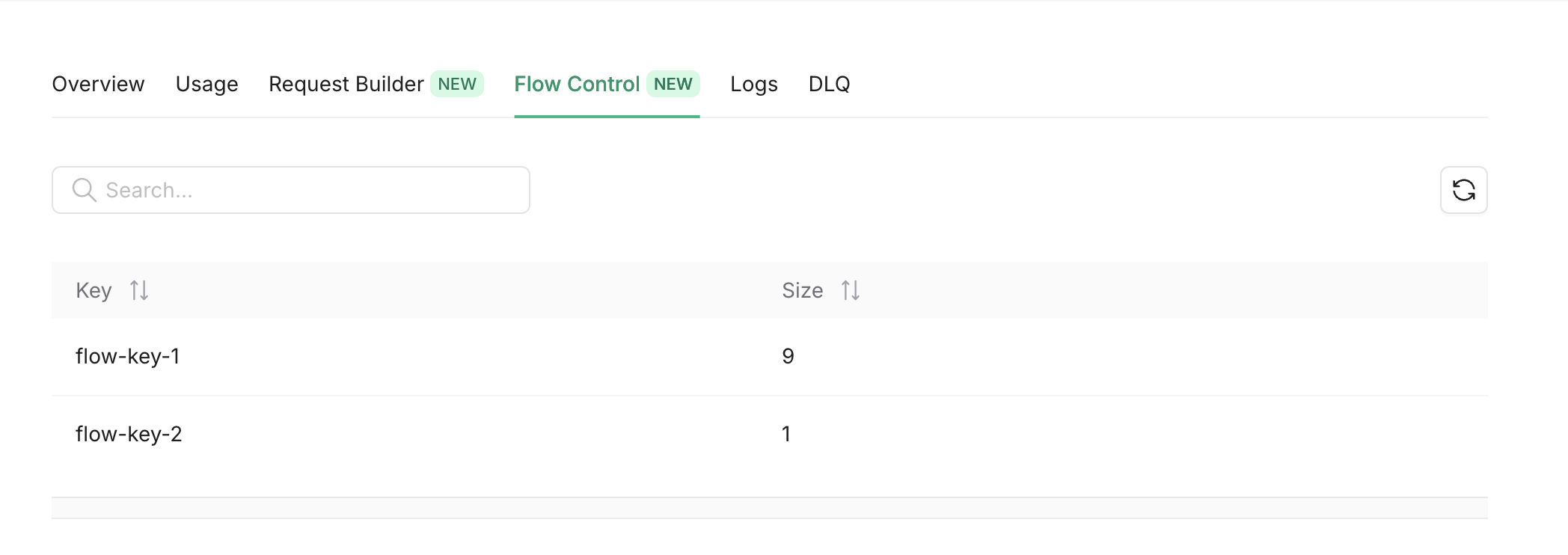
Also you can get the same info using the REST API.