# Overview
import { Catalog } from "/snippets/catalog.jsx";
Upstash Workflow lets you write **durable, reliable and performant serverless functions**. Get delivery guarantees, automatic retries on failure, scheduling and more without managing any infrastructure.
## Quickstarts
Upstash Workflow supports Next.js, Cloudflare Workers and [many other frameworks](/workflow/quickstarts/platforms) in TypeScript and Python.
Build a Next.js application with QStash Workflow
Use and deploy Upstash Workflow on Cloudflare Workers
Use Upstash Workflow for Python with Next.js and FastAPI
## Key Features
If your platform experiences a temporary outage, your workflow can pick up right where it left off, ensuring stability even in unstable environments.
Run long-running REST endpoints, such as complex AI models or video processing tools, even on serverless platforms with strict time limits.
Create workflows that wait for external events before proceeding. Ideal for user confirmations and asynchronous notifications.
Run jobs at regular intervals with support for cron expressions. Perfect for recurring tasks like reminders, reports, or newsletters.
Start independent tasks in parallel and wait for them to finish simultaneously, reducing latency.
Need your code to “sleep” for days, weeks, or even months? Supports long delays beyond serverless time limits.
Ensures at-least-once delivery. Failed requests are logged in a Dead Letter Queue to prevent data loss.
Prevent overwhelming your app or external services by configuring rate per second or parallelism limits.
Monitor workflow steps with insights. Filter events to track successes, failures, retries, and stalls.
## Example Use Cases
Here are some example real world use-cases for Upstash Workflow:
Use LLM Agents equipped with custom tools to achieve tasks
Download a large dataset without timeouts, process the data in chunks and generate a report.
Control workflow execution with events, log event data and send emails
Start a workflow from a webhook. Handle user creation, trial management,
email reminders and notifications.
Register a new user, send welcome emails, and periodically check and respond
to the user's activity state with emails.
Receive an order request, verify the stock, process the payment, and handle
order dispatch and customer notifications.
Manage uploading images to the data store. Apply filters and resize the
images to different resolutions in parallel.
Retry payments with a day of delay, send emails, and suspend account if
payment fails after the retries.
## How it works
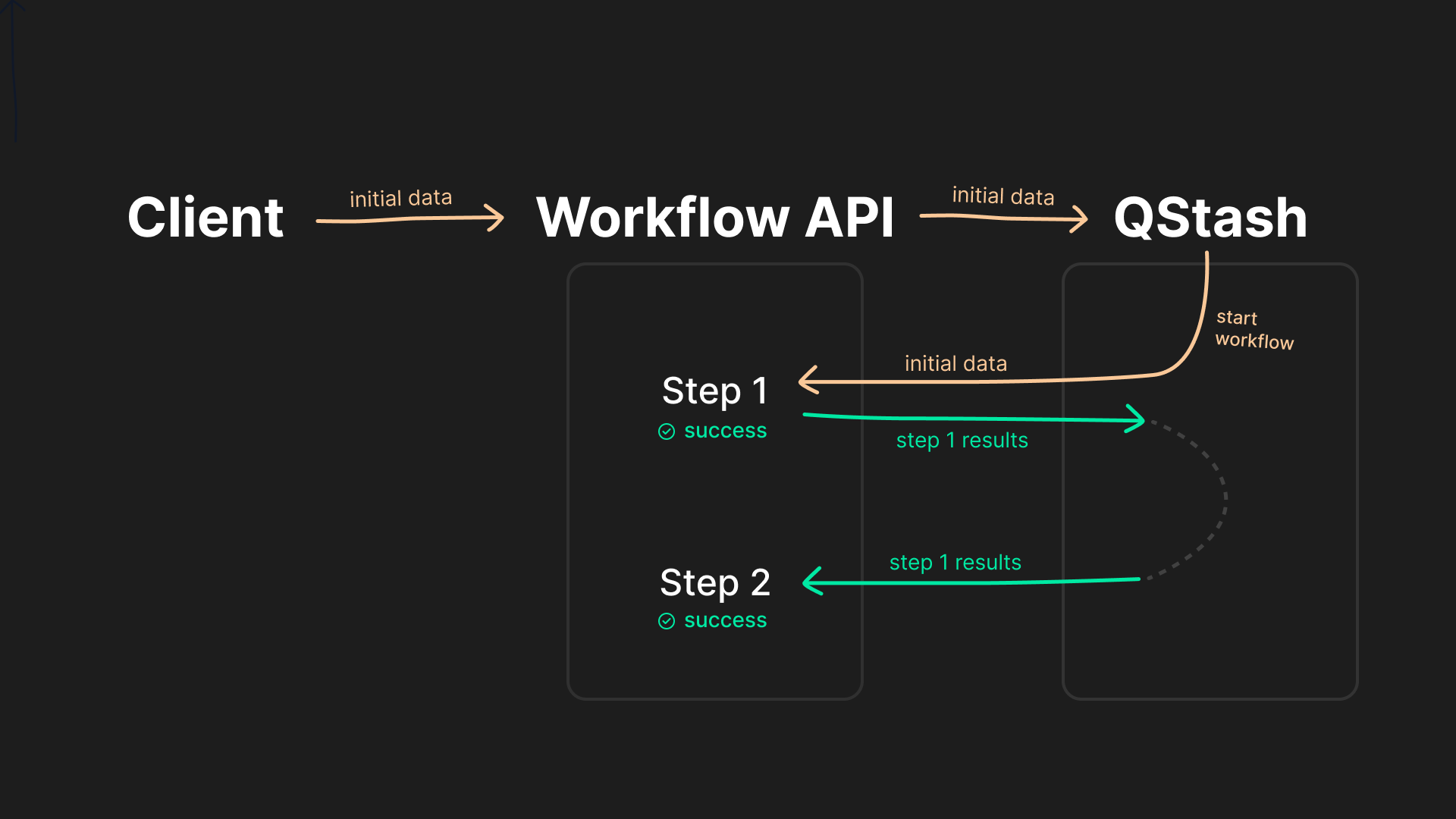
Upstash Workflow builds on the principle of steps. Instead of defining a single, complex piece of business logic, workflows contain multiple individual steps.
Each of the steps are executed by a separate request to your application, by preserving the output of previous steps.
In case of an error, a failed step is retried individually without needing to re-run any previous steps. Instead of the entire business logic, _each step_ can take up your serverless function execution duration, and many more benefits.
## Support
Need help or have questions? We're here to support you:
- Join our Discord community to ask questions and share feedback
- Open a ticket through the Intercom chatbox in the dashboard for any issue
## SDKs
 ## Support
Need help or have questions? We're here to support you:
- Join our Discord community to ask questions and share feedback
- Open a ticket through the Intercom chatbox in the dashboard for any issue
## SDKs
## Support
Need help or have questions? We're here to support you:
- Join our Discord community to ask questions and share feedback
- Open a ticket through the Intercom chatbox in the dashboard for any issue
## SDKs