# Verify Signatures
We send a JWT with each request. This JWT is signed by your individual secret
signing key and sent in the `Upstash-Signature` HTTP header.
You can use this signature to verify the request is coming from QStash.
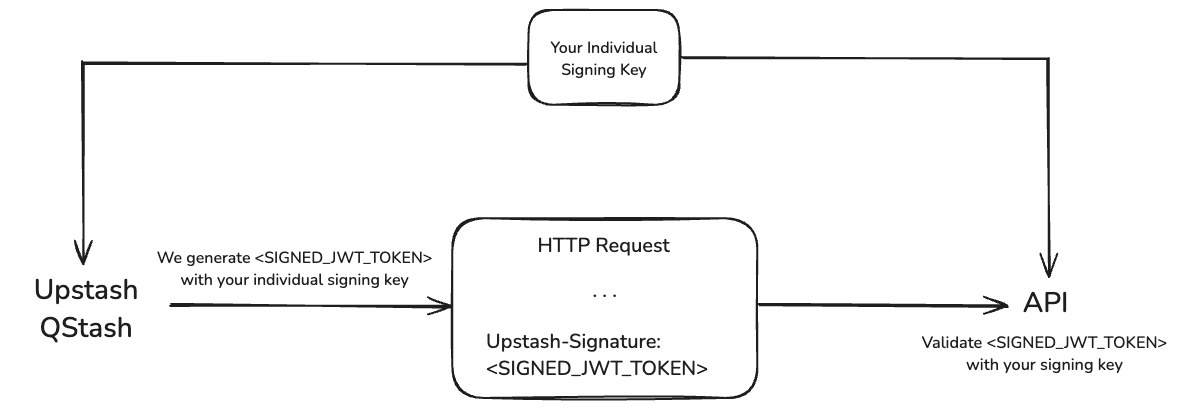
You need to keep your signing keys in a secure location.
Otherwise some malicious actor could use them to send requests to your API as if they were coming from QStash.
## Verifying
You can use the official QStash SDKs or implement a custom verifier either by using [an open source library](https://jwt.io/libraries) or by processing the JWT manually.
### Via SDK (Recommended)
QStash SDKs provide a `Receiver` type that simplifies signature verification.
```typescript Typescript
import { Receiver } from "@upstash/qstash";
const receiver = new Receiver({
currentSigningKey: "YOUR_CURRENT_SIGNING_KEY",
nextSigningKey: "YOUR_NEXT_SIGNING_KEY",
});
// ... in your request handler
const signature = req.headers["Upstash-Signature"];
const body = req.body;
const isValid = await receiver.verify({
body,
signature,
url: "YOUR-SITE-URL",
});
```
```python Python
from qstash import Receiver
receiver = Receiver(
current_signing_key="YOUR_CURRENT_SIGNING_KEY",
next_signing_key="YOUR_NEXT_SIGNING_KEY",
)
# ... in your request handler
signature, body = req.headers["Upstash-Signature"], req.body
receiver.verify(
body=body,
signature=signature,
url="YOUR-SITE-URL",
)
```
```go Golang
import "github.com/qstash/qstash-go"
receiver := qstash.NewReceiver("", "NEXT_SIGNING_KEY")
// ... in your request handler
signature := req.Header.Get("Upstash-Signature")
body, err := io.ReadAll(req.Body)
// handle err
err := receiver.Verify(qstash.VerifyOptions{
Signature: signature,
Body: string(body),
Url: "YOUR-SITE-URL", // optional
})
// handle err
```
Depending on the environment, the body might be parsed into an object by the HTTP handler if it is JSON.
Ensure you use the raw body string as is. For example, converting the parsed object back to a string (e.g., JSON.stringify(object)) may cause inconsistencies and result in verification failure.
### Manual verification
If you don't want to use the SDKs, you can implement your own verifier either by using an open-source library or by manually processing the JWT.
The exact implementation depends on the language of your choice and the library if you use one.
Instead here are the steps you need to follow:
1. Split the JWT into its header, payload and signature
2. Verify the signature
3. Decode the payload and verify the claims
- `iss`: The issuer must be`Upstash`.
- `sub`: The subject must the url of your API.
- `exp`: Verify the token has not expired yet.
- `nbf`: Verify the token is already valid.
- `body`: Hash the raw request body using `SHA-256` and compare it with the
`body` claim.
You can also reference the implementation in our
[Typescript SDK](https://github.com/upstash/sdk-qstash-ts/blob/main/src/receiver.ts#L82).
After you have verified the signature and the claims, you can be sure the
request came from Upstash and process it accordingly.
## Claims
All claims in the JWT are listed [here](/qstash/features/security#claims)